How Submissions Work
Once a campaign is available to post, creators can begin publishing content and submitting it to Jestr.
Understanding how submissions work is important because Jestr allows creators to publish the same piece of content across multiple platforms without each platform counting as a separate submission.
Your campaign settings determine how many submissions each creator can make, while your CPM and creator maximum determine how much they can earn from those submissions.
Posts vs. submissions
On Jestr, a post and a submission aren't necessarily the same thing.
A creator can publish the same piece of content across multiple supported platforms — such as TikTok, Instagram Reels, and YouTube Shorts — and group those posts together as a single submission.
For example:
A creator makes one video and posts it to TikTok, Instagram Reels, and YouTube Shorts.
3 platform posts = 1 Jestr submission
The views generated across all of those posts are combined when tracking the performance of that submission.
So if the video receives:
- 50,000 views on TikTok
- 20,000 views on Instagram
- 10,000 views on YouTube
That submission has generated 80,000 total views for the campaign.
Submission limits
When setting up your campaign, you choose the maximum number of submissions each creator can make.
For example, if your campaign allows 3 submissions per creator, a creator can make three different pieces of content.
Each of those submissions can still contain eligible posts across multiple supported platforms.
This means a creator could potentially have:
Submission 1 → TikTok + Instagram + YouTube
Submission 2 → TikTok + Instagram
Submission 3 → TikTok + YouTube
That's 7 individual platform posts, but only 3 Jestr submissions.
Why allow multiple submissions?
We generally recommend giving creators room to make multiple submissions rather than putting everything behind a single attempt.
Short-form content can be unpredictable, and giving creators multiple opportunities allows them to experiment with different hooks, formats, moments, and ideas to find what resonates with their audience.
This is especially useful for gameplay creators. A creator may discover new moments while playing, try a different style after seeing how their first video performs, or simply find that their second or third idea connects much more strongly than their first.
Multiple submissions give creators room to experiment without requiring your team to prescribe exactly what they should make.
How views are tracked
As creators publish and submit content, Jestr automatically tracks the eligible views generated by their posts.
Views from all eligible platforms and submissions are combined toward the creator's overall campaign performance.
These views are then used to calculate creator rewards based on your campaign's CPM and creator maximum.
You don't need to manually verify views or calculate creator payments as the campaign runs. Jestr handles this automatically through the campaign reward cycle.
For more information on how views are converted into creator earnings, see Budget, CPM & Rewards.
Creator reward maximums
Each creator's submissions are subject to the maximum reward per creator you've established for the campaign.
For example, imagine your campaign has:
- $6 CPM
- 3 submissions per creator
- $1,500 maximum reward
At a $6 CPM, a creator would reach their $1,500 maximum after generating 250,000 eligible views.
Those views can come from any combination of their three submissions and the platforms they're posted on.
For example:
Submission 1 → 50,000 views
Submission 2 → 100,000 views
Submission 3 → 350,000 views
Total campaign views generated → 500,000
The creator still earns a maximum of $1,500, even though their content ultimately generated 500,000 views.
Those additional views aren't lost from your reporting. They continue contributing to the campaign's overall performance, which means the campaign's effective CPM can end up lower than the CPM you've set for creator rewards.
In this example, paying $1,500 for 500,000 total views results in an effective CPM of $3.00, despite the creator reward rate being set at $6 CPM.
This is one of the reasons your campaign's set CPM and effective CPM aren't necessarily the same — content can continue generating views even after a creator has reached their maximum reward.
The maximum applies across the creator's entire batch — not individually to each submission or platform post.
For a complete explanation of how CPM, effective CPM, earning thresholds, creator maximums, and campaign budgets interact, see Budget, CPM & Rewards.
Additional submissions with Bonus Batches
Reaching a submission or reward maximum doesn't necessarily mean a creator has to stop making content for your campaign.
Creators who want to continue can request a Bonus Batch.
A Bonus Batch gives them a new set of submissions with its own reward maximum, separate from their previous batch.
This makes it possible to give creators who are performing well — or simply want to keep creating — another opportunity to participate without increasing the limits for every creator in the campaign.
For a full explanation, see Bonus Batches.
Submissions don't require approval
Creator content does not need to be submitted to your studio for approval before it's published.
Creators make and publish content in their own style, then submit their posts to Jestr for tracking.
As long as their content follows your Campaign Guidelines, Sponsorship Disclosure requirements, and Jestr's policies, the submission is eligible to participate in the campaign and earn rewards.
If a submission doesn't meet those requirements, you can flag it through Jestr's Flags & Appeals system.
This distinction is important: submissions are used to track and reward creator content, not to request creative approval from the studio.
Viewing campaign submissions
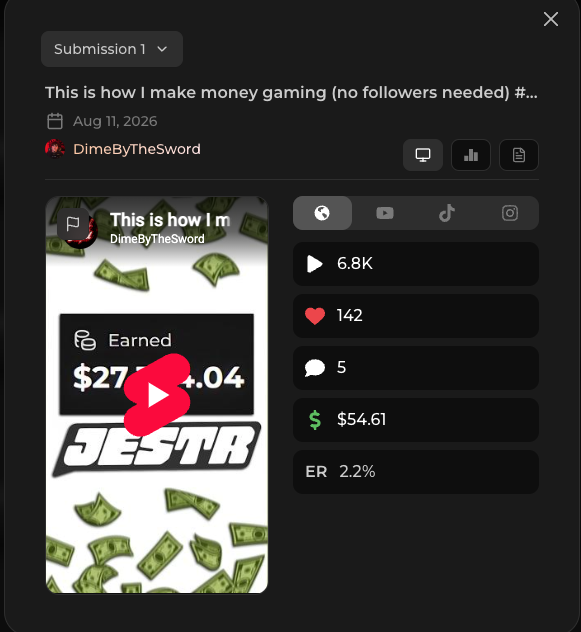
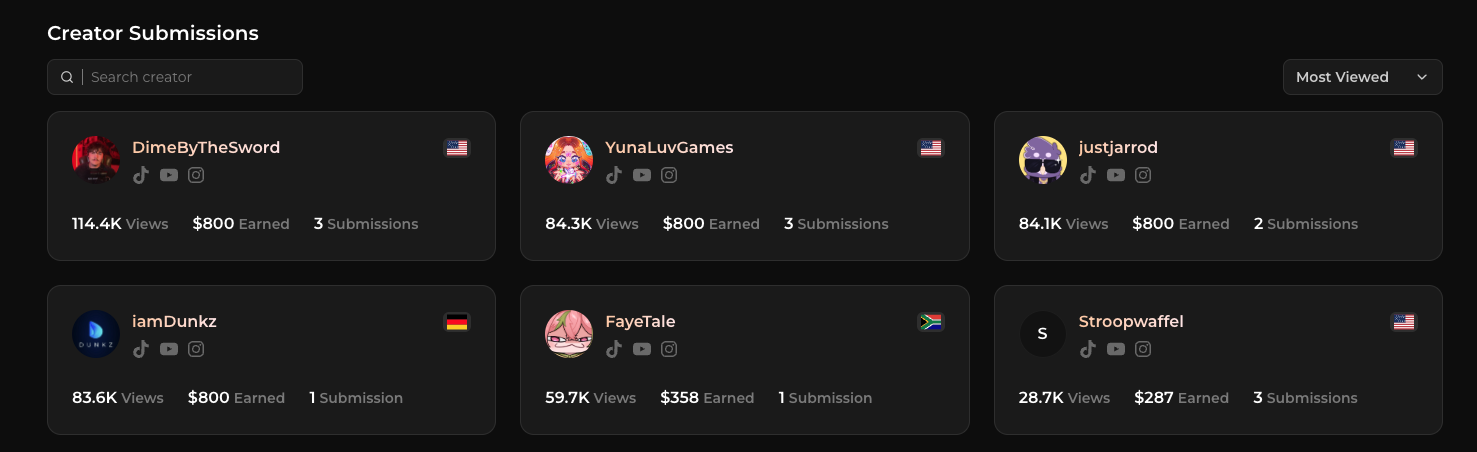
As creators submit content, you'll be able to see their videos and performance from your active campaign.
You can view individual submissions, see which platforms they've been posted to, follow their views and engagement over time, and drill down into individual platform performance.
For more information on the analytics available for submissions, see Reporting & Data.
Next: Budget, CPM & Rewards
Now that you understand how creator content enters a campaign and how submissions are counted, the next step is understanding how those views turn into creator rewards.
Continue to Budget, CPM & Rewards to learn about campaign budgets, CPMs, earning thresholds, creator maximums, and how rewards are distributed.