Campaign Guidelines
Campaign Guidelines define the strict requirements creators must follow when creating content for your campaign.
Unlike suggested talking points, guidelines aren't recommendations. If you enable a guideline, creators are expected to follow it for their submission to remain eligible for rewards.
Think of the difference as:
Talking point: "We'd love if you talked about this."
Guideline: "You must follow this for your submission to be eligible."
Because guidelines are enforceable, we recommend only enabling requirements that are genuinely important to your campaign.
Choosing your guidelines
Jestr provides a set of predefined guidelines that you can enable when creating your campaign.
Depending on the guideline, you'll also be able to configure additional options to better reflect your requirements.
Available guidelines include:
- Video should be 25 seconds long (minimum)
- Include game name in video
- Don't mention other games or media
- Tag our social accounts (if applicable)
- List-style videos allowed
- Content must be family-friendly (no profanity)
- No AI-generated content (captions are okay)
- Footage must be up to date
- Voiceless videos allowed
- Key giveaways are allowed
Not every campaign needs every guideline. In general, giving creators as much creative freedom as your campaign allows makes it easier for them to create content that fits naturally with their existing audience and style.
Video should be 25 seconds long
This sets a minimum video length of 25 seconds for eligible submissions.
Use this when you want to ensure creators dedicate enough time to meaningfully showcase your game rather than submitting extremely short clips.
Include game name in video
This requires the game's name to be included somewhere in the content so viewers can identify what they're watching.
Importantly, creators don't necessarily need to verbally say the game's name.
The name can be included naturally through:
- On-screen text
- The video's caption
- Spoken commentary
This allows organic gameplay clips and other formats to remain eligible without forcing creators to awkwardly work the game's name into their commentary.
Don't mention other games or media
This guideline gives you control over whether creators can reference other games, franchises, or media when talking about your game.
You can choose from several levels of restriction:
- Don't mention any other games or media
- Don't mention other games, while allowing comparisons to other media
- Only mention approved games or media, using a custom allowlist
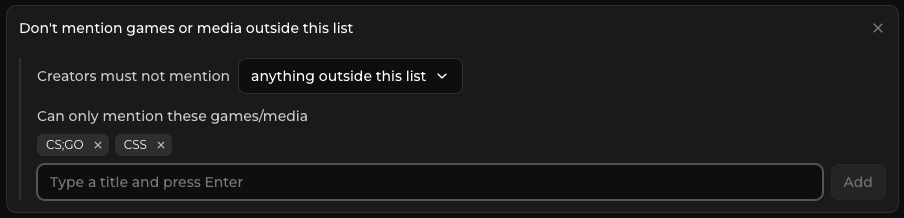
Should I restrict comparisons?
For most campaigns, we don't recommend restricting comparisons unless there's a specific reason to do so.
Comparisons are a natural part of how creators communicate what a game is like. Comparing an unfamiliar game to something audiences already understand can make for an effective hook and immediately give viewers a point of reference.
Restrictions are more useful when there are specific games, franchises, or properties you don't want associated with your campaign, or when there are only certain comparisons you're comfortable allowing.
In those cases, an allowlist can give creators useful points of reference while preventing comparisons you specifically want to avoid.
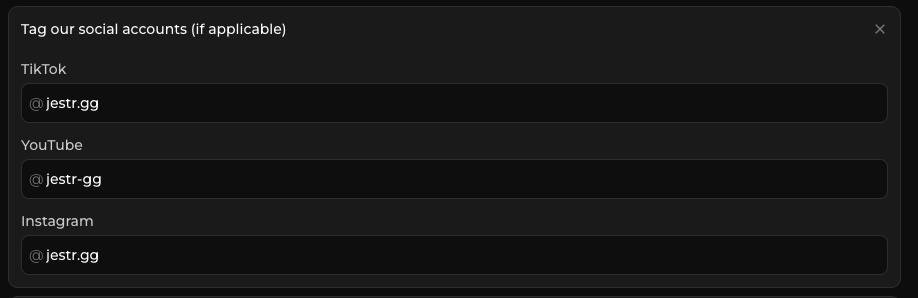
Tag our social accounts
This requires creators to tag your game's or studio's social account when publishing their content.
When enabled, you can provide your:
- TikTok username
- Instagram username
- YouTube username
You only need to enter the portion of the username that appears after the @ symbol.
List-style videos allowed
List-style content features your game alongside multiple other games within the same video.
For example:
"3 demos you need to try during Steam Next Fest"
"5 cozy games you might have missed"
"My favourite games from this week's showcase"
This is different from a creator simply comparing your game to another game. Saying "this is like X, but with Y" doesn't make the submission a list-style video.
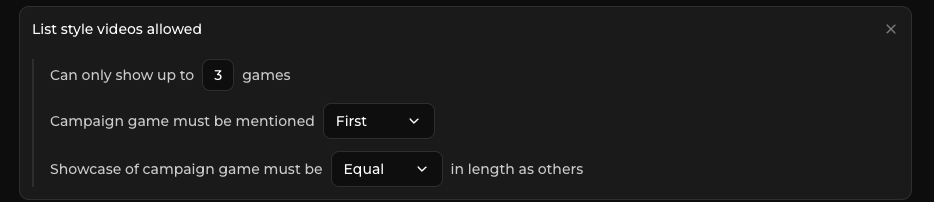
When list-style videos are allowed, you can configure additional requirements including:
- Maximum number of games shown
- Whether your game must appear first, second, or anywhere in the list
- Whether your game's showcase must be equal to or longer than the time given to other games
When should I allow list-style videos?
List-style content can be an effective way to position your game alongside games or topics audiences already care about.
It's particularly useful during events, showcases, festivals, and sales, when players are being presented with many games at once and often turn to creators to help narrow down what they should pay attention to.
We frequently recommend allowing list-style videos around beats such as:
- Steam Next Fest
- Major showcases and gaming events
- Seasonal sales
- Demo festivals
- Genre-specific events
These formats also work well when your game naturally belongs to a recognizable category, such as cozy games, horror games, roguelikes, or upcoming demos.
For a general awareness campaign, list-style content is more situational. You can still allow it, but it isn't something every campaign necessarily needs.
Content must be family-friendly
This requires creator content to remain family-friendly and free of profanity.
This can be useful for games with younger audiences, brands with stricter content requirements, or campaigns where you want to maintain a particular tone.
If profanity isn't a concern for your game or brand, you don't necessarily need to enable this requirement.
No AI-generated content
This guideline prevents creators from using AI-generated content as part of their submission.
This can include things such as:
- AI-generated voiceovers or text-to-speech
- AI-generated images
- AI-generated thumbnails
- AI-generated animation
- AI-based image manipulation or upscaling
Basic captioning tools are still allowed.
Most Jestr creators aren't producing heavily AI-generated content, but some creators may use tools such as text-to-speech or AI-assisted features built into their editing software.
This guideline gives studios that don't want AI-generated or AI-assisted material associated with their game a clear way to communicate that requirement.
Footage must be up to date
Use this guideline when older footage of your game exists publicly but shouldn't be used for the campaign.
For example, your Steam page, previous trailers, or older online coverage may show an outdated build of the game.
Enabling this requirement tells creators to use new gameplay they capture themselves or the current assets you've specifically provided through the campaign.
This can be particularly useful for games that have changed significantly during development or campaigns built around an updated build that isn't yet publicly available.
Make sure creators have access to the correct footage or build when enabling this requirement.
For more information on providing better campaign materials, see Building Great Asset Packs.
Voiceless videos allowed
Enabling this guideline allows creators to submit content without spoken commentary or voiceover.
Voiceless content can include formats such as:
- Gameplay showcases
- Trailer or footage-based edits
- On-screen text and captions
- Visually driven game recommendations
Jestr has many creators whose content is built around these formats, and allowing them can significantly broaden the number of creators and content styles available to your campaign.
We generally recommend allowing voiceless content unless spoken commentary is specifically important to your campaign.
Key giveaways are allowed
This allows creators to use campaign keys as part of community giveaways connected to their content.
Giveaways can generate additional engagement, particularly through comments and audience participation, although they don't necessarily guarantee significantly more views.
Creators may request additional keys when planning a giveaway, or your campaign can be configured to make multiple keys available where appropriate.
If you don't want campaign keys redistributed or don't want giveaways used as part of creator content, leave this disabled.
For more information on providing keys and handling additional key requests, see Keys & Key Requests.
Sponsorship disclosure
All sponsored creator content on Jestr must follow their local regulation's Sponsorship Disclosure requirements.
Disclosure requirements are separate from your creative guidelines and apply regardless of the content format a creator chooses.
You can also provide any additional disclosure instructions required for your campaign during setup.
For the full requirements, see Sponsorship Disclosure.
Guidelines vs. talking points
Campaign Guidelines should only be used for things creators actually have to do.
If something is simply an idea you'd like creators to consider, put it in your Suggested Talking Points instead.
For example:
Guideline: Include the game's name somewhere in the video or caption.
Talking point: We'd love to see creators highlight the game's co-op mechanics.
A creator can ignore the second suggestion entirely and still produce a valid submission.
This distinction is particularly important on Jestr because creators aren't working from a pre-approved script or creative brief. They're expected to make content in their own style while respecting the strict requirements you've established.
For more guidance, see Writing Better Talking Points.
What happens if a creator breaks a guideline?
Content isn't pre-approved by studios before creators publish it.
If a submitted video violates one of your enabled Campaign Guidelines, you can flag the submission from your campaign dashboard.
Flagged submissions aren't eligible for payment while the flag remains unresolved. The creator can make the necessary changes and submit an appeal, after which you can review the submission again.
Because flags directly affect creator rewards, they should only be used for genuine guideline or policy violations, not because you would have personally preferred a different creative direction.
For a complete explanation of this process, see Flags & Appeals.
Keep guidelines focused
More guidelines don't necessarily make a better campaign.
Every strict requirement reduces the range of content creators can experiment with. Unless something is genuinely important to your game, brand, legal requirements, or campaign strategy, consider leaving creators room to decide how best to present the game to their audience.
Use Campaign Guidelines for requirements and Talking Points for inspiration.
Next: Keys & Key Requests
Depending on your campaign, creators may need access to a playable build before they can start making content.
Continue to Keys & Key Requests to learn how game keys are distributed, how creators request access, and how giveaways work.